A use case template is a fixed set of fields you fill in for each use case: name, goal, actors, preconditions, postconditions, a basic flow, alternate flows, exception flows, business rules, priority and status. Using the same fields every time makes every use case on a project readable in the same way. Flowifex is a use case modeling and requirements tool for business analysts that stores these fields as structured data and generates the business requirements document from them.
This page lists each field, shows what to write in it and explains when a Word file is enough and when it stops being enough. Last updated October 22, 2026.
Want to start from the finished fields? Jump to the field-by-field table, or read the guide on how to write a use case.
What is a use case specification?
A use case specification is the written description of one use case. It records who the actor is, what they want to achieve, what must be true before and after, and the steps the actor and the system take. It is the text behind the oval on a use case diagram.
The diagram shows which use cases exist and who uses them. The specification says what happens inside each one. Developers read it to build the behavior, testers read it to write test cases, and stakeholders read it to confirm the system does what the business needs.
See what the diagram side looks like in what a use case diagram is used for.
The use case template, field by field
The table lists each field, what to write in it and a short example. The examples are illustrative and use a wallet app as the subject.
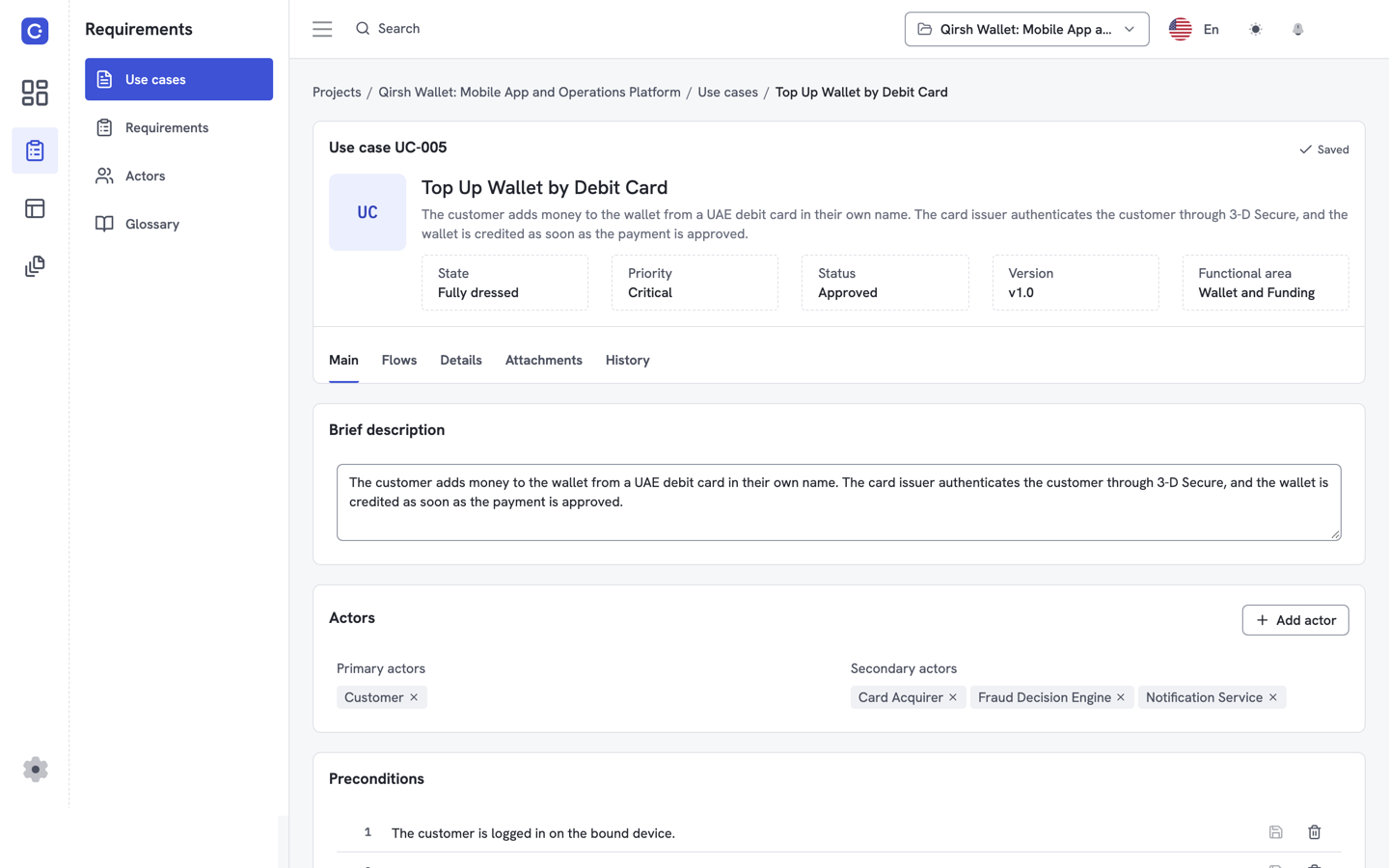
| Field | What to write | Example |
|---|---|---|
| Name | A short verb phrase that states what the actor achieves. | Transfer money to a saved contact |
| Goal | One sentence on the outcome the primary actor wants. | The customer sends funds to a saved contact from their wallet. |
| Actors | The primary actor, plus any supporting role or external system. | Customer (primary); payment processor (supporting) |
| Preconditions | What must be true before the first step runs. | The customer is signed in and has a saved contact. |
| Postconditions | What is true after the use case ends, for success and for failure. | Success: the balance is reduced and the transfer is recorded. |
| Basic flow | Numbered steps for the main success path, one actor action or system response per step. | 1. Customer selects a contact. 2. Customer enters an amount. 3. System shows a summary. 4. Customer confirms. 5. System records the transfer. |
| Alternate flows | Valid variations of the basic flow. Name the step where each one branches and where it rejoins. | At step 2, the customer picks a different currency; the flow resumes at step 3. |
| Exception flows | Failure paths: what goes wrong at which step and how the system responds. | At step 4, the balance is too low; the system shows an error and the use case ends. |
| Business rules | Constraints that apply to steps, written once and referenced by name. | A transfer cannot exceed the daily limit. |
| Priority | Use one scale for the whole project, such as Critical, High, Normal, Low. | High |
| Status | Where the use case sits in review. | Draft, in review, approved |
Use case template for Word
You can use the fields above in Word today. Make a table with one row per field and a numbered list for each flow. For one or two use cases, that is enough.
The trouble starts once a project has many use cases. Step numbers change when someone inserts a step, and every alternate flow that points at the old number is now wrong. Business rules get retyped in several files. A requirement is quoted in one document and edited in another.
In Flowifex the same fields are structured data. Each requirement link is stored against the step itself, not its number, and business rules belong to their use case. A step can link to a requirement and a screen. The business requirements document is generated from that data, and you can still export it to Word.
See how steps trace to requirements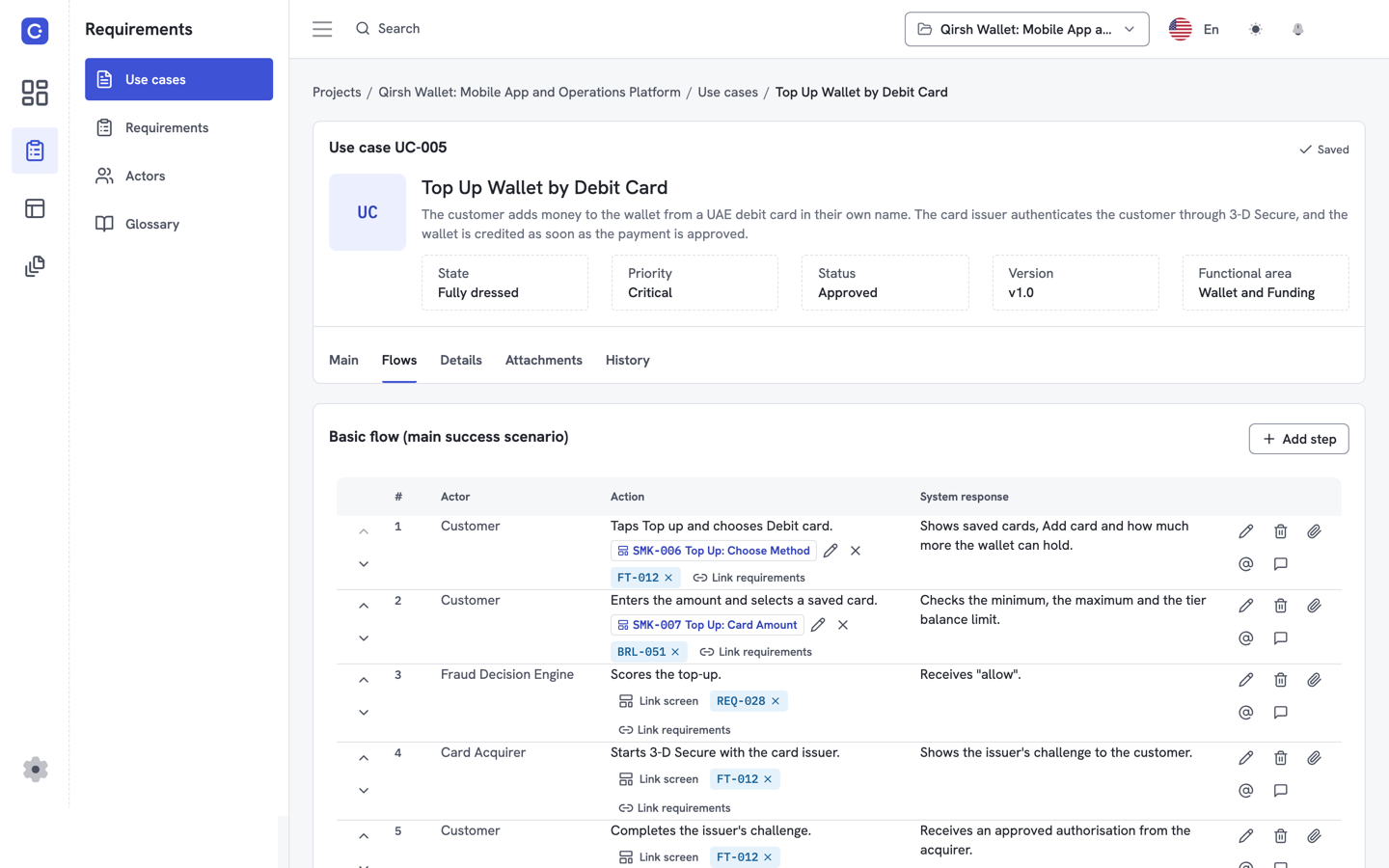
What is the difference between a basic and a full use case template?
A basic use case template has only a name, actor, goal and a numbered list of steps. A full template adds conditions, other flows and business rules. Use the basic one for early discovery and the full one before development starts.
| Template | Fields | Use when |
|---|---|---|
| Basic | Name, actor, goal, steps | You are listing what the system must do and the details are unknown. |
| Full | Basic fields plus preconditions, postconditions, alternate flows, exception flows, business rules | Development is about to start and the missing paths must be found. |
A practical route is to start with the basic fields for every use case, then fill in the remaining fields for the use cases you will build first.
Use case template software: what changes
Software changes what the template is connected to. In a document, a step is a line of text. In Flowifex, a step is an object that can carry a linked requirement and a linked screen, and it sits in a use case that has its own business rules.
Steps link to requirements
Attach a requirement to a single step, then read coverage and gaps in the traceability matrix.
Steps link to screens
Connect a step to a screen mockup, then walk stakeholders through the clickable screen flow.
The scenario diagram is generated
The flows you write produce a scenario diagram for each use case, so the text and the picture stay in step.
The BRD is generated
The business requirements document reads from the same fields, so nothing is retyped.
Flowifex is a use case modeling tool, not a general UML suite. If you also need the actor-and-oval picture, see the use case diagram tool.
Create free accountUse case template FAQ
A use case template should include a name, goal, actors, preconditions, postconditions, a basic flow, alternate flows, exception flows, business rules, priority and status. The flows carry most of the value, because they are where developers and testers find the behavior the system must support.
Yes. Copy the field list on this page into a Word table with one row per field and a numbered list for each flow. If you want structure that does not drift between documents, the Free plan in Flowifex has a use case editor with these fields and needs no card.
An alternate flow is a valid variation of the basic flow, such as choosing a different payment method. An exception flow is a failure path, such as a declined payment or a lost connection. Alternate flows usually rejoin the basic flow. Exception flows usually end the use case or return the actor to an earlier step.
Keep the basic flow short, with each step describing one actor action or one system response. If you need more steps, the use case probably covers more than one goal. Split it into smaller use cases and link them with include or extend relationships.
Keep every spec in one place.
Start with a free project.
Model use cases, link requirements and generate
your BRD. Free plan, no card needed.