A requirements traceability matrix (RTM) is a table that links each requirement to the work that satisfies it. It proves that every requirement is covered and that nothing was added without one.
Flowifex is a requirements management and use case modeling tool for business analysts that builds the traceability matrix from requirements linked to individual use case steps. It shows coverage as a percentage, lists the gaps and exports the matrix to CSV.
Last updated October 22, 2026, by Alaa Jawhar
Create free accountWhat is a requirements traceability matrix?
The matrix is a grid. One axis lists requirements. The other lists the items they must be traced to, such as use case steps, design elements or test cases. A mark in a cell means the two are linked.
What it contains
Each row is a requirement with an ID, a type and a priority. Each link points to the step or test that covers it. Empty rows are requirements nothing covers. Empty columns are steps that no requirement explains.
Forward and backward traceability
Forward traceability starts at a requirement and finds what satisfies it. Backward traceability starts at a step or a test and finds the requirement behind it. Forward checks catch missing work. Backward checks catch work nobody asked for.
Who uses it
Business analysts build and maintain the matrix. QA leads use it to plan tests. Product and delivery leads use it to check scope before sign-off. Anyone asking which requirement covers a given step can read the answer from it.
Requirements traceability matrix example (sample)
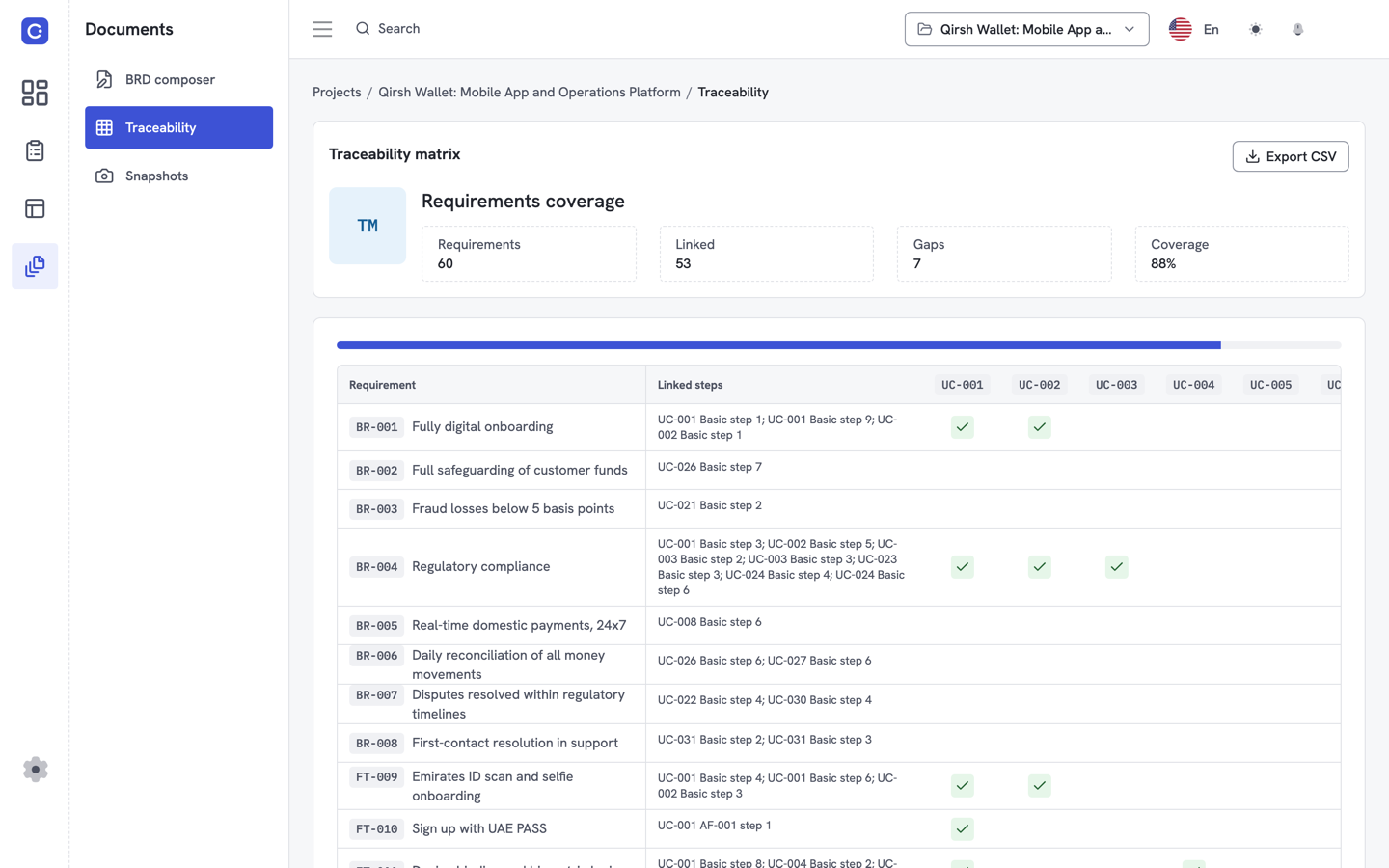
The example is the matrix of a sample project. Rows are requirements. Columns are the steps of its use cases. Each requirement has one of four types (Business Requirement, Business Rule, Feature or Requirement) and a MoSCoW priority.
A coverage percentage shows how many requirements link to at least one step. In the screenshot, 60 requirements show 88% coverage. Requirements with no linked step are listed as gaps, so you see what is missing before review and not after.
Reading it takes three questions. Which rows are empty? Which steps have no requirement? Is the coverage figure high enough to start review?
A worked sample of four rows
Take BR-012, a Must requirement linked to basic flow step 4. That row is covered. A row with no step, like BR-015 below, is a gap you resolve before sign-off.
| ID | Requirement | Priority | Step | Covered |
|---|---|---|---|---|
| BR-012 | The system must confirm the payment by email | Must | Basic flow step 4 | Yes |
| BR-013 | The user can review the order before paying | Should | Basic flow step 2 | Yes |
| BR-014 | A failed payment is retried once | Could | Basic flow step 6 | Yes |
| BR-015 | The user can save a card for later | Should | None | No |
Illustrative sample table written for this page, not an export from a customer project.
Requirements traceability matrix template
A useful template has eight columns. Copy them into a spreadsheet to start, or let software keep them for you.
| Column | What it holds |
|---|---|
| ID | A stable identifier such as BR-012, so the row survives edits to the wording. |
| Requirement | One sentence that states what the system or the business must do. |
| Type | One of four types: Business Requirement, Business Rule, Feature or Requirement. |
| Priority | Must, should, could or won't (MoSCoW). |
| Use case | The use case where the requirement is exercised. |
| Step | The flow step that satisfies it, for example basic flow step 4. |
| Acceptance criteria | The condition a reviewer or tester checks to accept it. |
| Status | Draft, agreed, built or verified. Pick values your team uses. |
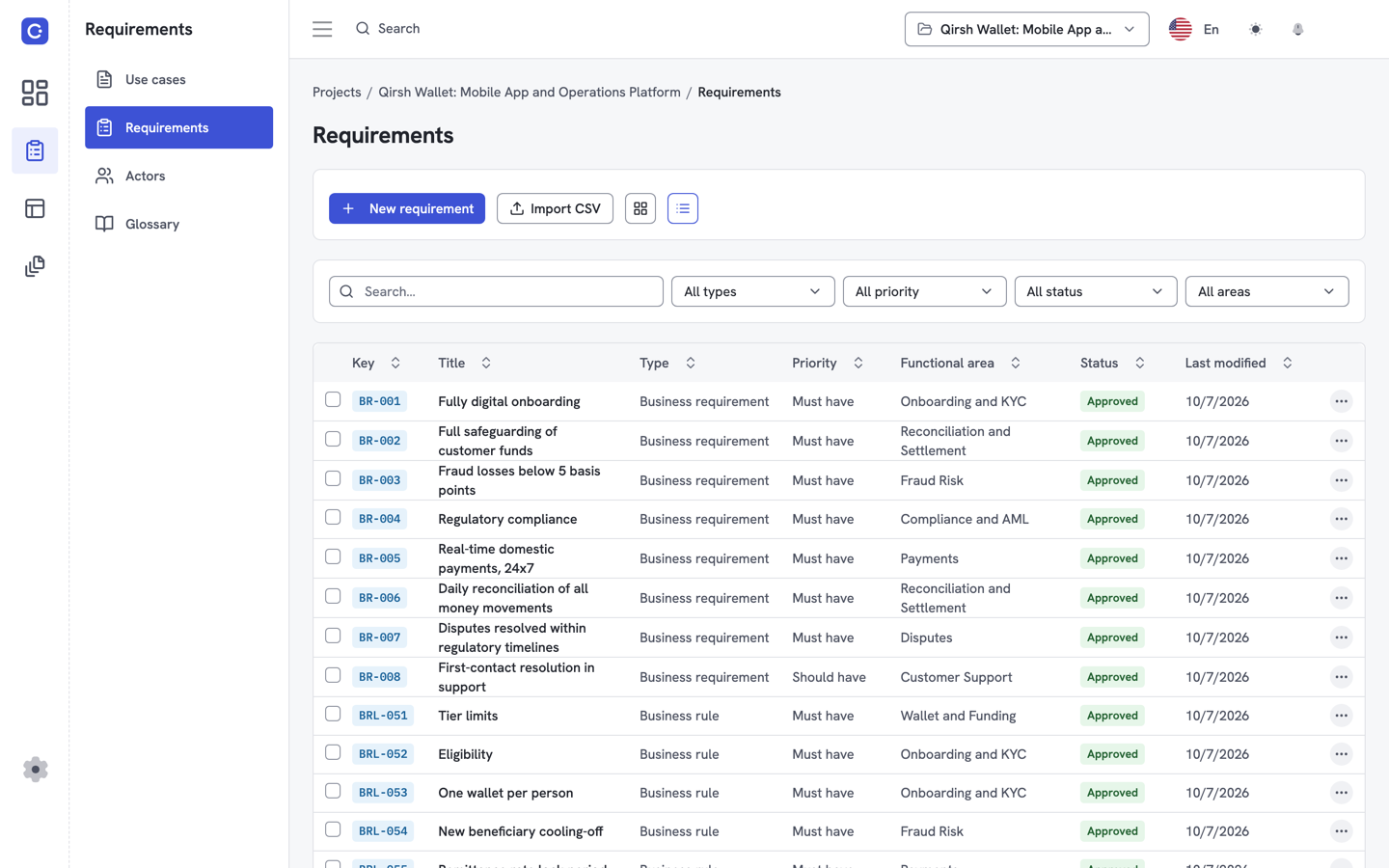
Flowifex keeps requirement type, priority and acceptance criteria on each requirement and links it to use case steps. The matrix view exports to CSV, so you can share it with people who work in a spreadsheet.
The matrix pairs with a use case template and a business requirements document. Start with the use case template and the business requirements document template.
Requirements traceability matrix software or a spreadsheet?
A spreadsheet is enough for a short project that changes little. It stops working when steps are renumbered, because the links are typed text that nobody updates. Software that stores each link against the step itself removes that manual upkeep and reports coverage for you.
| Question | Spreadsheet | Flowifex |
|---|---|---|
| Step is renumbered | You edit every affected cell by hand | Links are stored on the step, not typed as a number |
| Link level | Whatever you typed, often the whole use case | Individual basic flow steps |
| Coverage and gaps | Formulas you write and maintain | Coverage percentage and gap list |
| Sharing | Send the file | Export to CSV |
Larger suites such as Jama Connect, IBM DOORS Next and Visure Requirements ALM also generate matrices and suit regulated, multi-team programs (vendor pages checked 2026-10-22). Flowifex is lighter. It is aimed at business analysts, from solo analysts to teams of 20 and more, and it prices per project, not per user.
Requirements management software
How do you build the matrix in Flowifex?
You do not build the grid by hand. You write use cases and requirements, link each requirement to the steps that satisfy it, and the matrix reads those links. Open it to see coverage and gaps, then export it to CSV.
1. Write the use case
Add the basic flow as numbered steps, plus alternate and exception flows. Each basic flow step is a place to link to.
2. Add requirements
Choose a type, set a MoSCoW priority and write acceptance criteria, so each requirement can be checked.
3. Link to steps
Attach each requirement to the basic flow steps that satisfy it, and the matrix fills in.
4. Check and export
Open the matrix, review coverage and gaps, then export it to CSV for people who work in a spreadsheet.
For a longer explanation, read what is a requirements traceability matrix.
Requirements traceability matrix FAQ
A requirements traceability matrix proves that every requirement is covered by a design element, a use case step or a test, and that nothing was built without a requirement behind it. It lets you answer coverage questions from one table.
Forward traceability follows a requirement to the steps, tests or components that satisfy it. Backward traceability follows an item back to the requirement that justifies it. A complete matrix supports both directions.
Yes, for a small project that changes rarely. Spreadsheets break when steps are renumbered or requirements are split, because the links are typed text. Software that stores the links against each step avoids that retyping.
Yes. Flowifex shows the matrix with a coverage percentage and the gaps, and exports it to CSV. The app does not import requirements from CSV yet. Flowifex does not connect to other trackers today.
Keep every spec in one place.
Start with a free project.
Model use cases, link requirements and generate
your BRD. Free plan, no card needed.