Flowifex is a use case modeling and requirements tool for business analysts that includes an online use case diagram editor and a use case diagram generator for scenario diagrams. You draw actors and use cases, connect them with include, extend and generalization links, and can link each one to the matching actor or use case in the project.
The diagram is not a separate drawing. It lives in the same project as your flows, requirements and business requirements document. Linked actors and use cases take their names from the project, so the diagram and the text do not drift on naming.
Create free accountWhat is a UML use case diagram?
A UML use case diagram shows who uses a system and what they can do with it. It has three core parts: actors, use cases and a system boundary. Actors sit outside the boundary. Use cases sit inside it.
Lines between the parts are relationships, as defined in the OMG UML specification. An association joins an actor to a use case. The table shows the other three.

| Relationship | Meaning | Library example |
|---|---|---|
| Include | One use case always uses another. | Borrow a book includes check availability. |
| Extend | One use case adds optional behavior to another. | Pay a late fee extends renew a loan. |
| Generalization | A child actor or use case specializes a parent. | Premium member specializes member. |
A use case diagram shows scope, not steps. It tells a reader who can do what, and it stops there. The steps, conditions and rules that make each use case testable belong in the use case text, which Flowifex keeps next to the diagram in the same project.
A small example is an online library. The member and the librarian are actors. Borrow a book and renew a loan are use cases. Check availability is included by both. Pay a late fee extends renew a loan, because it only happens when the loan is overdue.
The diagram gives stakeholders the scope at a glance. The detail lives in the use case text. For the writing side, see the use case template and the post what a use case diagram is used for.
Draw a use case diagram online, linked to the specification
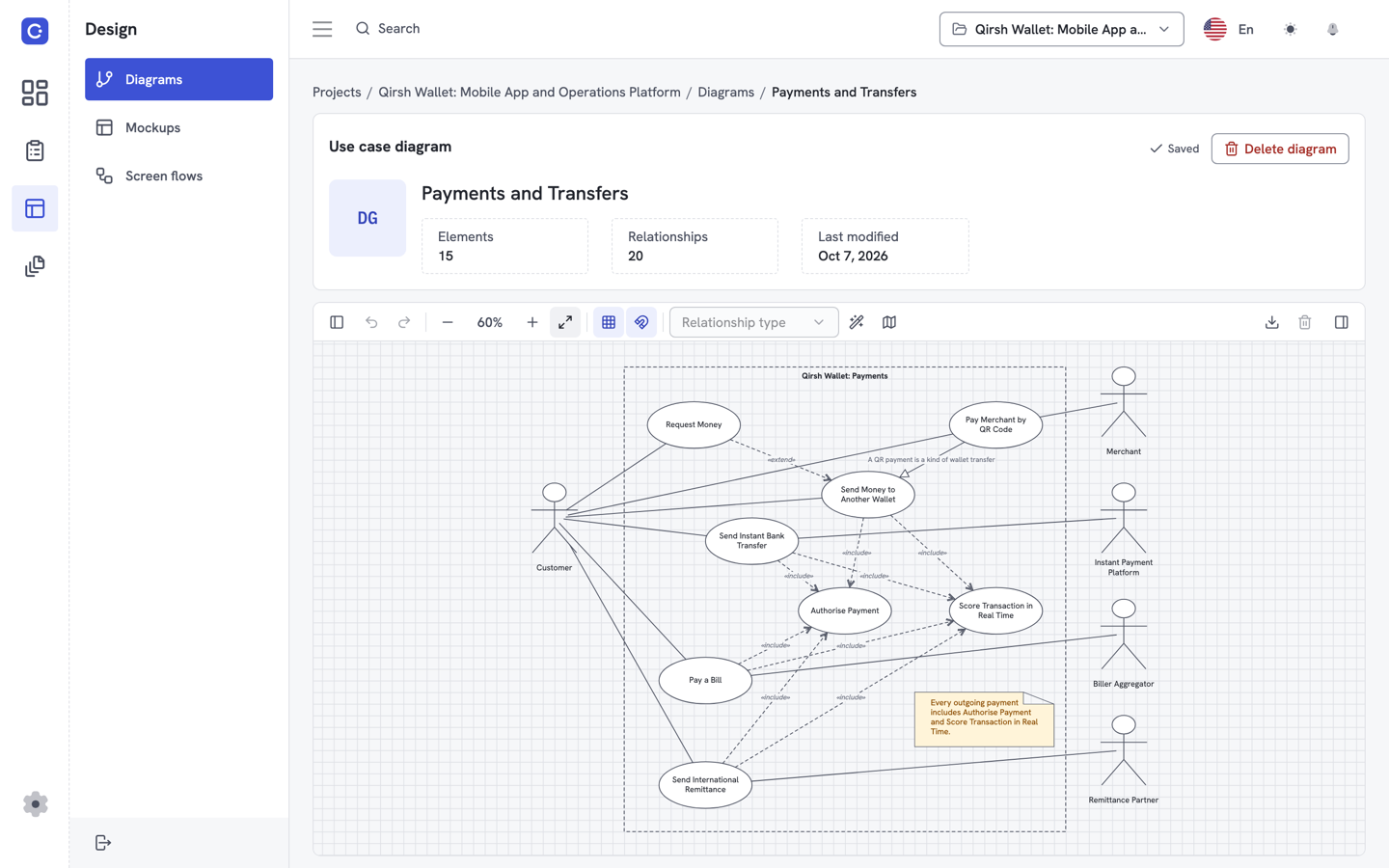
Open a project, add actors and use cases to the canvas and connect them. An actor or use case can point to a record in the project instead of a text label, so the diagram and the specification describe the same thing.
Actors and use cases
Place actors and use cases on the canvas and join them with associations.
Include, extend and generalization
Show shared steps, optional behavior and specialized roles with the standard UML links.
Linked to the use case record
Link a diagram use case to the project use case, so its name comes from the project and the flows sit next to the diagram.
Can Flowifex generate a use case diagram automatically?
As a use case diagram generator, Flowifex creates a scenario diagram for each use case from its flows, and you draw the system-level diagram yourself. You write the basic, alternate and exception flows as steps, and the app draws the scenario from them. You do not redraw it by hand when a step changes.
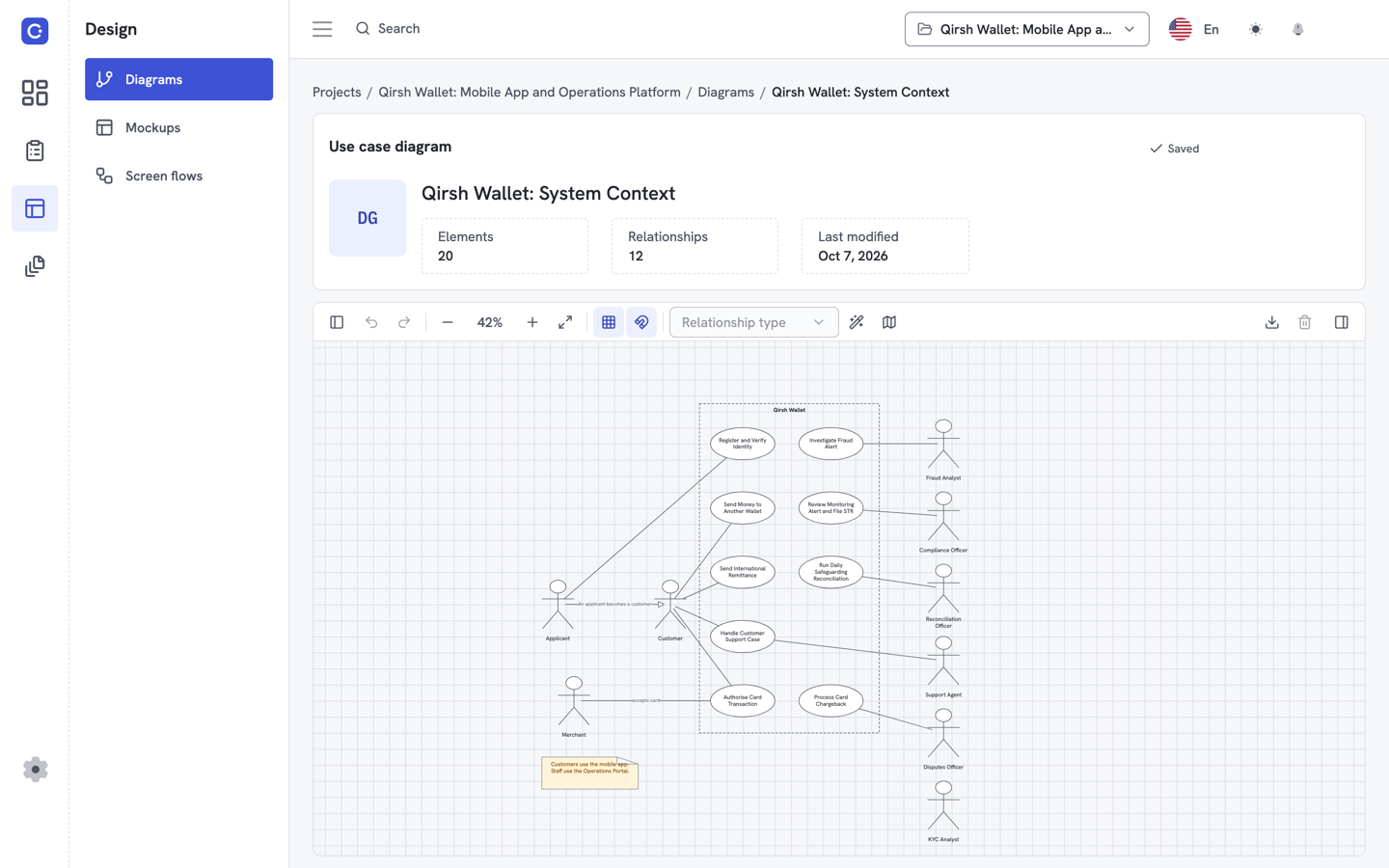
The system-level use case diagram stays under your control. You decide which actors and use cases belong in it and how they relate. The generated scenario diagram covers the detail inside a single use case.
This matters in reviews. A stakeholder asks why an actor can reach a use case, and you open the use case and show the steps. Another asks which requirement covers a step, and you show the requirement linked to it. The answer comes from the model, not from a second document.
If you work with an AI assistant, it can read and write the same project over MCP with your own permissions. That includes the use cases the diagram links to.
Can I export and share a use case diagram?
Yes. Export a diagram as a PNG or SVG image from the app when you need it in a slide or an email. Diagrams are exported separately; the generated business requirements document holds text and tables only.
Share the document by link with an optional expiry, or export it to Word or PDF. Stakeholders do not need an account to read it. See the business requirements document template for the 12 sections.
Is Flowifex a full UML tool?
No. Flowifex is not a general UML suite. It does not draw class diagrams or sequence diagrams. It covers use case diagrams, use case flows, screen mockups, screen flows, requirements and the BRD.
If you need a diagram for every UML type, use a dedicated modeling tool for those. If you need use case diagrams that stay connected to the text and the requirements, that is what this page is about.
See pricingUse case diagram tool FAQ
Yes. The Free plan costs $0, needs no card and includes all modeling features, including use case diagrams. It has one member. Team plans raise the member cap and do not unlock features. There is no free trial.
Flowifex generates a scenario diagram for each use case from its flows. You draw the system-level use case diagram yourself, with actors, use cases and the include, extend and generalization links between them.
You can draw associations between actors and use cases, include and extend links between use cases, and generalization links. Flowifex does not draw class or sequence diagrams.
Yes. The app can export a diagram as an image in PNG or SVG format. The business requirements document you generate from the project is separate: it can be shared by link with an optional expiry or exported to Word and PDF, and it contains text and tables only.
Keep every spec in one place.
Start with a free project.
Model use cases, link requirements and generate
your BRD. Free plan, no card needed.