- Pick ReqView if you need ISO/IEC/IEEE 29148 templates, Git or SVN version control and desktop apps for safety-critical work.
- Pick Flowifex if you write use cases and want the business requirements document (BRD) generated from them, with a free solo plan and a flat price per project.
Flowifex is a use case modeling and requirements tool for business analysts. ReqView is a requirements management tool from a vendor that describes it as “powered by Git”. This page compares the two on facts from ReqView’s own pages, each linked with the date we checked it. It also says plainly when ReqView is the better choice.
Last checked: November 18, 2026
What is ReqView?
ReqView calls itself a “Requirements Management Tool Powered by Git” on its home page. It supports version control in Git or Subversion and offers templates based on ISO/IEC/IEEE 29148:2018. The vendor positions it for safety-critical automotive, aerospace and defense, and medical device work.
The current release on the ReqView download page is 2.22.5, dated November 5, 2026. It runs on Windows 11 or later, Ubuntu 22.04 or Debian 12 and later, and macOS 15 or later on Apple silicon. A web app runs in current Chrome, Edge or Firefox.
Its specification templates cover ISO/IEC/IEEE 29148, OWASP ASVS, user stories, FMEA and the Volere process. None of them is a use case template.
Why do analysts compare ReqView with other tools?
We could not read dated one- and two-star reviews of ReqView, so this page lists no complaint-based switching triggers. The reasons below come only from ReqView’s own pages. They are differences in how the product is sold and built, not opinions.
| Reason | ReqView | Flowifex | Source |
|---|---|---|---|
| How price grows | Per user: PRO €440 and TEAM €600 per user per year | Per project: Team 10 is $3,000 a year for up to 10 members | ReqView pricing page; Flowifex pricing page |
| Free option | FREE edition edits 1 document with up to 150 objects and 1 custom attribute | Free plan: 1 member, unlimited projects, all modeling features | ReqView pricing page |
| Use case flows | No use case template among the 5 specification templates | Basic, alternate and exception flows with actors, conditions and business rules | ReqView templates page |
| Document output | Export to Word, Excel, PDF and HTML on PRO | 12-section BRD generated from the model; Word and PDF export; share link with expiry | ReqView pricing page |
| Contract shape | Yearly subscription, 3- or 6-month terms; no monthly plan; no perpetual license | Monthly or yearly per project; cancel at period end | ReqView pricing page |
| AI assistant access | Not described on the pages we checked | Remote MCP server with OAuth sign-in and your own role, on every plan | ReqView home and pricing pages |
Sources, all checked November 18, 2026: ReqView pricing, ReqView download, ReqView home page and ReqView specification templates. Flowifex figures come from Flowifex plans and prices. ReqView lists prices in euros, so we do not convert them.
How does Flowifex work differently?
Flowifex is built around the use case. You write the goal, actors, preconditions and postconditions, then the basic, alternate and exception flows. Requirements attach to individual flow steps, each with a type, MoSCoW priority, status and acceptance criteria.
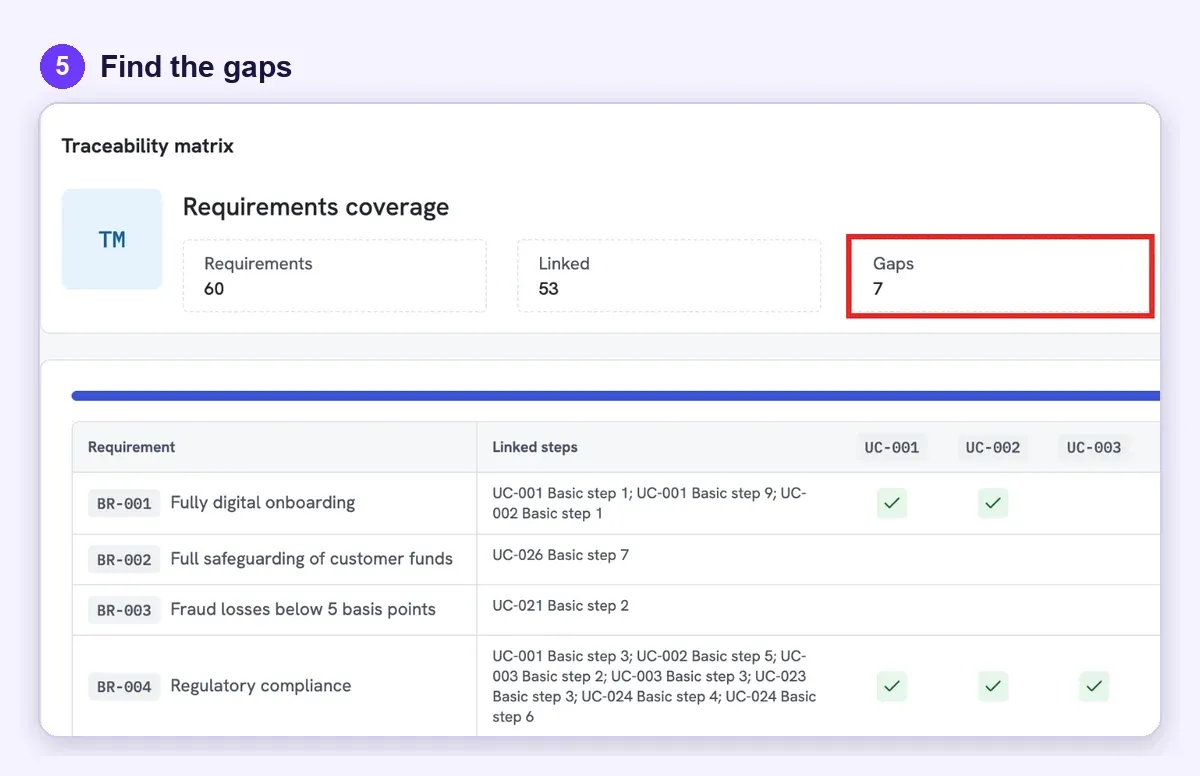
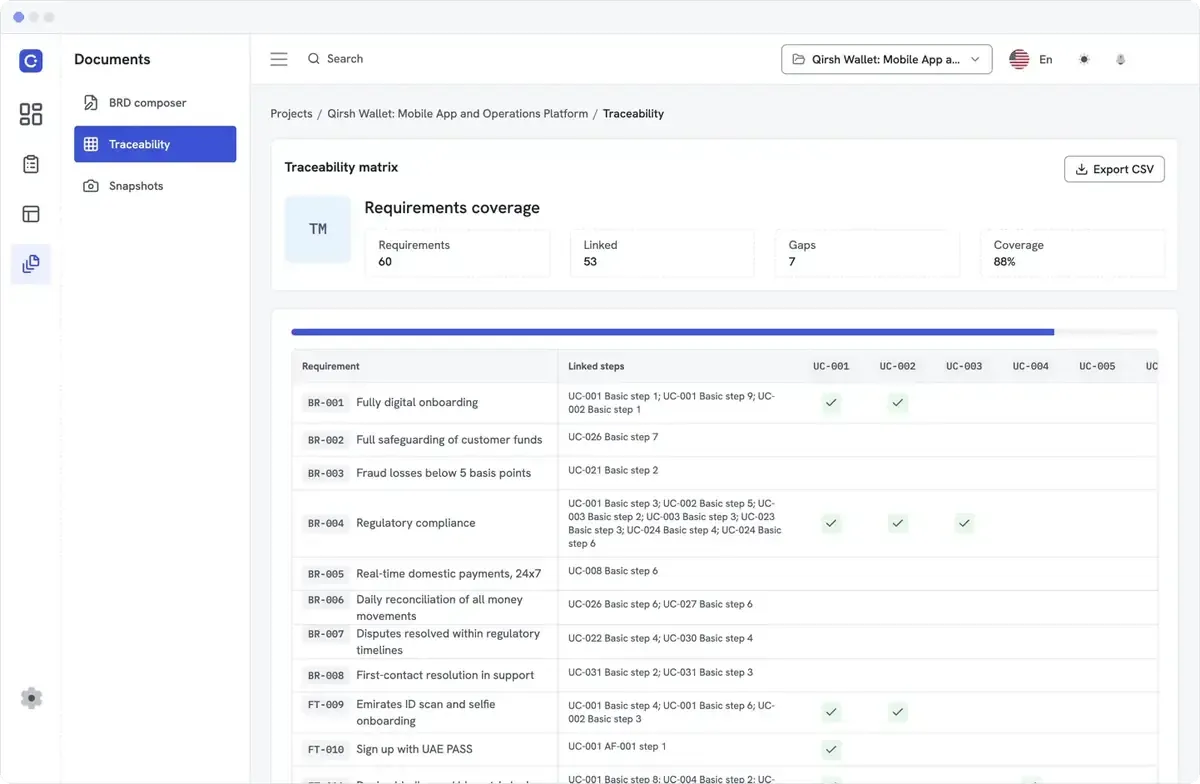
Use case diagrams, screen mockups and clickable screen flows live in the same project. The traceability matrix shows which requirements cover which steps, with covered and uncovered counts, and exports to CSV.
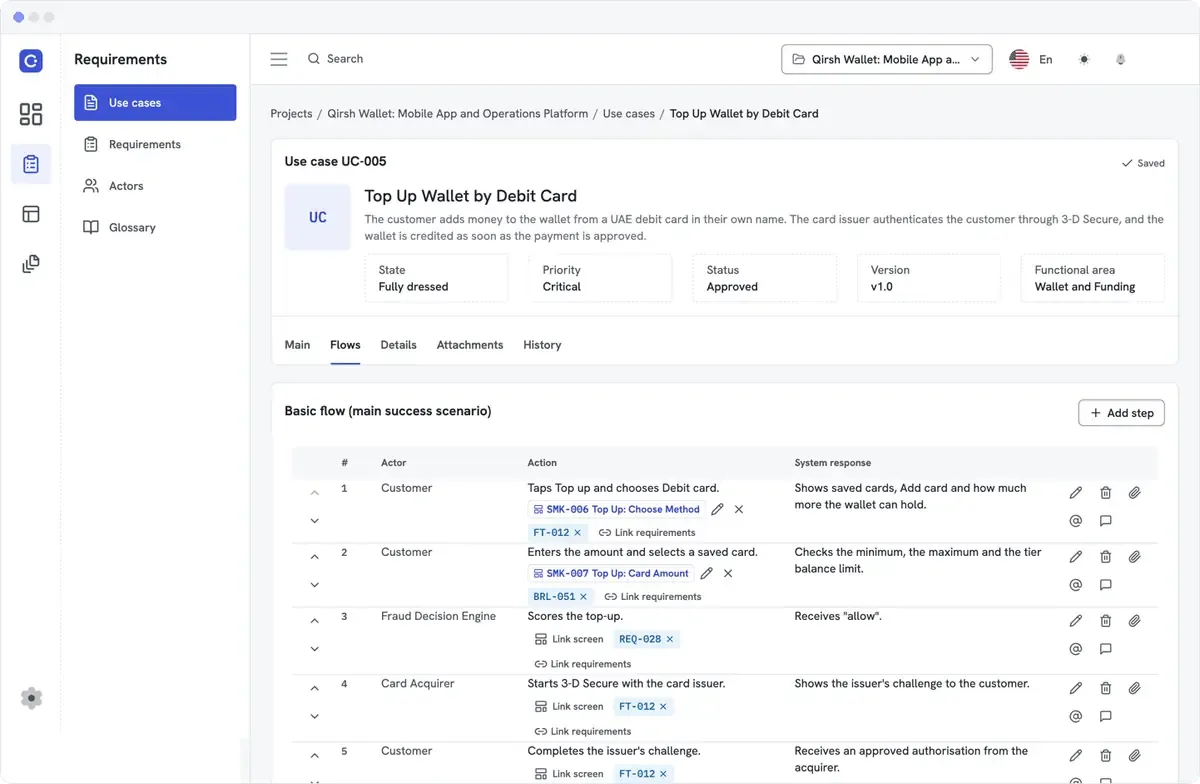
The BRD is a view of the model, not a separate file. It has 12 sections, from the executive summary to traceability and the glossary. You share it by link with an optional expiry, or export it to Word and PDF. It holds text and tables only, so diagrams stay in the app.
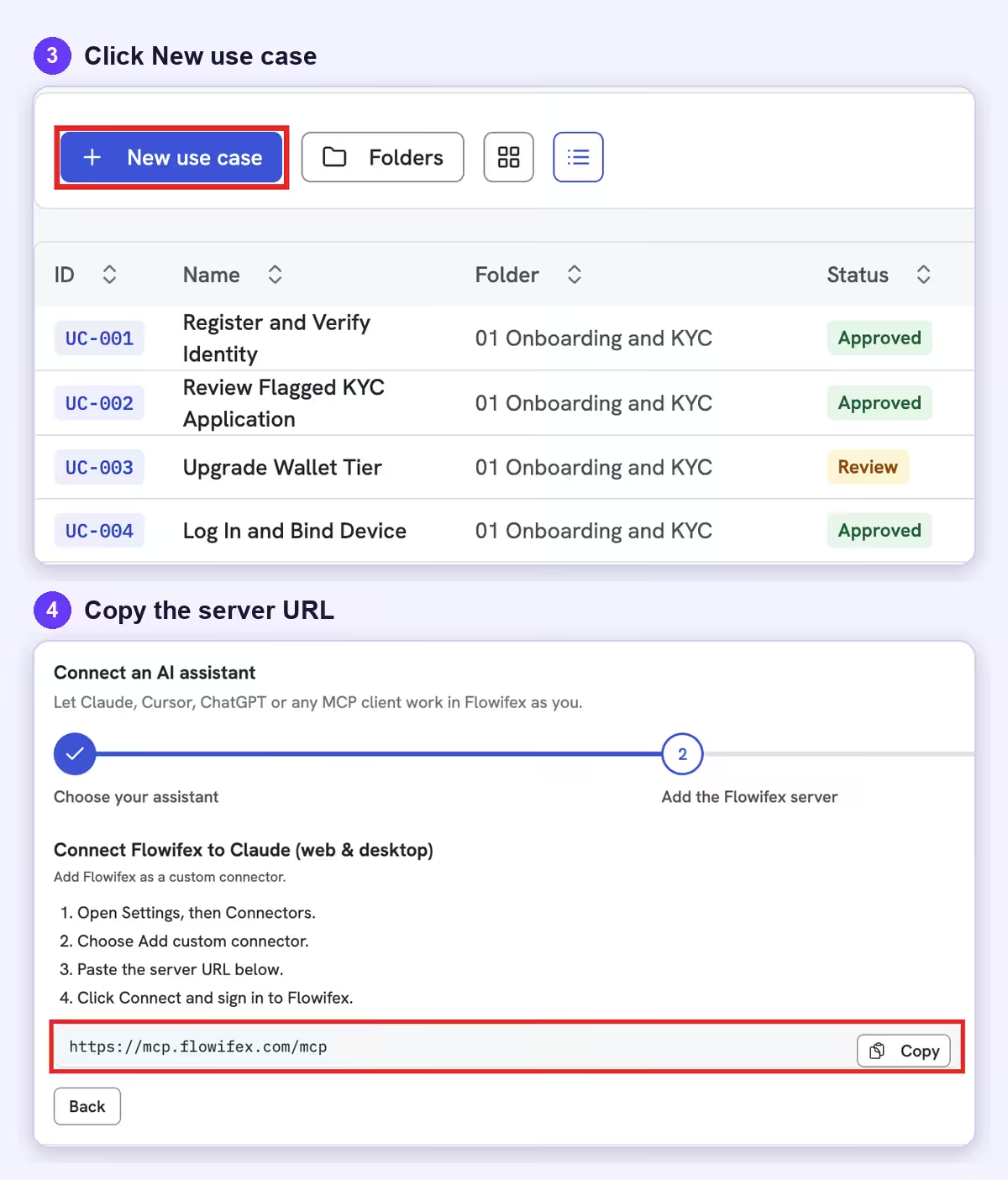
Claude, ChatGPT, Cursor or another MCP client can read and write the project through the Flowifex MCP server. The assistant signs in with OAuth and gets your role’s permissions. It cannot manage billing or members. See how to connect an AI assistant to Flowifex.
What does each tool cost for your team size?
ReqView charges per user. Flowifex charges per project, with a member cap per plan. The table shows one year on the cheapest plan that fits each team size. Both columns use list prices and round nothing.

| Team size | ReqView PRO | ReqView TEAM | Flowifex, one project |
|---|---|---|---|
| 1 analyst | €440 | €600 | $0 (Free plan) |
| 5 people | €2,200 | €3,000 | $3,000 (Team 10, yearly) |
| 10 people | €4,400 | €6,000 | $3,000 (Team 10, yearly) |
| 20 people | €8,800 | €12,000 | $5,000 (Team 20, yearly) |
ReqView figures multiply the per-user prices on the ReqView pricing page; ENTERPRISE floating licenses start at €5,400 a year for 3 clients. Flowifex prices are per project. A team that runs three projects on Team 10 pays for three projects. A solo analyst with ReqView PRO pays less than any paid Flowifex plan, but the Flowifex Free plan has one member and costs $0.
How do you move from ReqView to Flowifex?
Flowifex has no ReqView importer and no file import in the interface. Plan the move as re-entry, helped by your AI assistant.
- In ReqView, export the requirements document to Excel. ReqView lists Excel export on the PRO plan.
- Save the sheet as CSV with one requirement per row: ID, text, type and priority.
- Create a free Flowifex project and write the use cases the requirements belong to.
- Connect Claude, ChatGPT or Cursor over MCP, and ask it to import the CSV through the Flowifex requirements import tool.
- Link each requirement to the flow step it covers, then open the traceability matrix to find uncovered ones.
- Check the result against the ReqView export before you retire the old document.
Links, attachments and document structure do not carry over. Keep the ReqView export as the record of what you moved.
Where is ReqView the better choice?
- Requirements in Git. ReqView keeps requirements under Git or SVN version control next to your source code. Flowifex keeps project snapshots and an audit history, not Git.
- Standards-based specifications. If you write an SRS to ISO/IEC/IEEE 29148, or need FMEA or OWASP ASVS templates, ReqView ships them. Flowifex generates a BRD, not an SRS.
- Safety-critical programs. ReqView targets automotive, aerospace and medical device teams. Flowifex is not built for regulated change control.
- Integrations and ReqIF. ReqView TEAM lists Azure DevOps, Sparx EA and ReqIF exchange. Flowifex has no integrations; the MCP server is the only way other tools connect.
- Desktop apps. ReqView ships apps for Windows, Linux and macOS. Flowifex is a web app only.
- One analyst on a paid plan. ReqView PRO at €440 a year costs less than Flowifex Team 10 if you need paid features alone. On Flowifex a solo analyst stays on the free plan.

Who should choose Flowifex instead?
- Choose Flowifex if your deliverable is a BRD that stakeholders sign, and you build it from use cases.
- Choose it if a team of five to twenty people shares one project and you want a flat yearly price.
- Choose it if you want an AI assistant to draft and update the model with your permissions.
Flowifex has no single sign-on, no live co-editing and no integrations. Check those against your requirements before you move a team.
What are other ReqView alternatives?
Each entry is one line from the vendor’s own pages, checked November 18, 2026.
Jama Connect
An engineering platform with Creator, Stakeholder, Reviewer and Test Runner licenses. Prices are quote-based; reviewers and hosting are listed at no charge. Best for large regulated programs. Read the full Jama Connect comparison.
IBM DOORS Next
A web-based requirements product that names ASPICE, ISO 26262 and DO178C. No prices are published; the call to action is a live demo. Best for compliance-driven systems engineering. See the IBM DOORS Next comparison page.
CaseComplete
Installed software for writing use cases and generating requirements documents. A perpetual Solo license is $699. Best for analysts who want a one-time purchase. Read the CaseComplete comparison for analysts.
Modern Requirements
Requirements management for Azure DevOps teams, sold in four packages on three-year terms. Prices come in a tailored proposal. Best for teams that live in Azure DevOps. See the Modern Requirements comparison page.
See every comparison on the requirements management alternatives hub.
Questions about ReqView alternatives
Flowifex has a Free plan at $0 with one member, unlimited projects and all modeling features. ReqView also has a FREE edition, limited to editing one document with up to 150 objects, per its pricing page checked November 18, 2026.
ReqView lists PRO at €440 and TEAM at €600 per user per year. ENTERPRISE costs €1,800 per floating client per year, with a minimum of three clients. There is no perpetual license. Checked November 18, 2026 on reqview.com/pricing.
Not directly. Export requirements from ReqView to Excel, save them as CSV, and ask your connected AI assistant to import them through the Flowifex MCP server. Use cases, diagrams and links are re-entered by hand.
No. Flowifex keeps project snapshots and an audit history, and exports the BRD to Word and PDF and the traceability matrix to CSV. If you need Git versioning or ReqIF exchange, ReqView is the better fit.
Model one real use case and generate the BRD
The Free plan has one member, unlimited projects and every modeling feature. No card is needed.