Flowifex is a use case modeling and requirements tool for business analysts that runs in the browser and generates the business requirements document from the same model. If you are looking at CaseComplete and want a web-based option with diagrams, mockups and traceability linked to the text, this page compares the two as fairly as the public information allows.
The main difference is where the work lives. CaseComplete is sold as a licensed program you install and activate. Flowifex is a web app you sign in to. Both help you write use cases and produce requirements documents, and the right choice depends on how your team works.
Last checked: 2026-10-22. Vendor details come from the sources listed below the table.
In short
- Pick Flowifex for a browser workspace, a free solo plan and AI assistant access.
- Pick CaseComplete for a perpetual license and installed software.
What is CaseComplete?
CaseComplete is a requirements management product from Serlio Software. Its site describes it as “the agile requirements management tool that Business Analysts love”, for capturing software requirements and use cases and generating requirements documents automatically.
Its product tour describes a Roadmap that guides you through a consistent approach to gathering requirements. The vendor also offers a free online class. The latest release named on the site is CaseComplete Pro 15.
The CaseComplete license is perpetual: you can use the software indefinitely and get free upgrades and support for one year. That suits teams that want a one-time purchase and installed software.
How is Flowifex different from CaseComplete?
Flowifex covers the same starting point, structured use cases, and then keeps going into diagrams, mockups, traceability and the document. Six differences matter most.
It runs in your browser
You sign in at app.flowifex.com and work on the project. Nothing to install, and reviewers can use a share link or the exported Word or PDF.
Diagrams and mockups stay linked to the text
Use case diagrams, screen mockups and clickable screen flows live in the same project as the flows of events. A change to a use case shows up where it is referenced.
Traceability at step level
Requirements attach to individual flow steps, with MoSCoW priority and acceptance criteria. The traceability matrix shows coverage and gaps, and exports to CSV.
A BRD generated from the model
The 12-section document is a view of the project. Share it by link with an expiry, or export it to Word and PDF.
Your AI assistant can work in the project
Claude, ChatGPT, Cursor or any MCP client signs in with OAuth and gets exactly your role's permissions. It cannot manage billing or members.
A free plan for one analyst
The Free plan costs $0, has one member and includes every modeling feature. Team plans only raise the member cap.
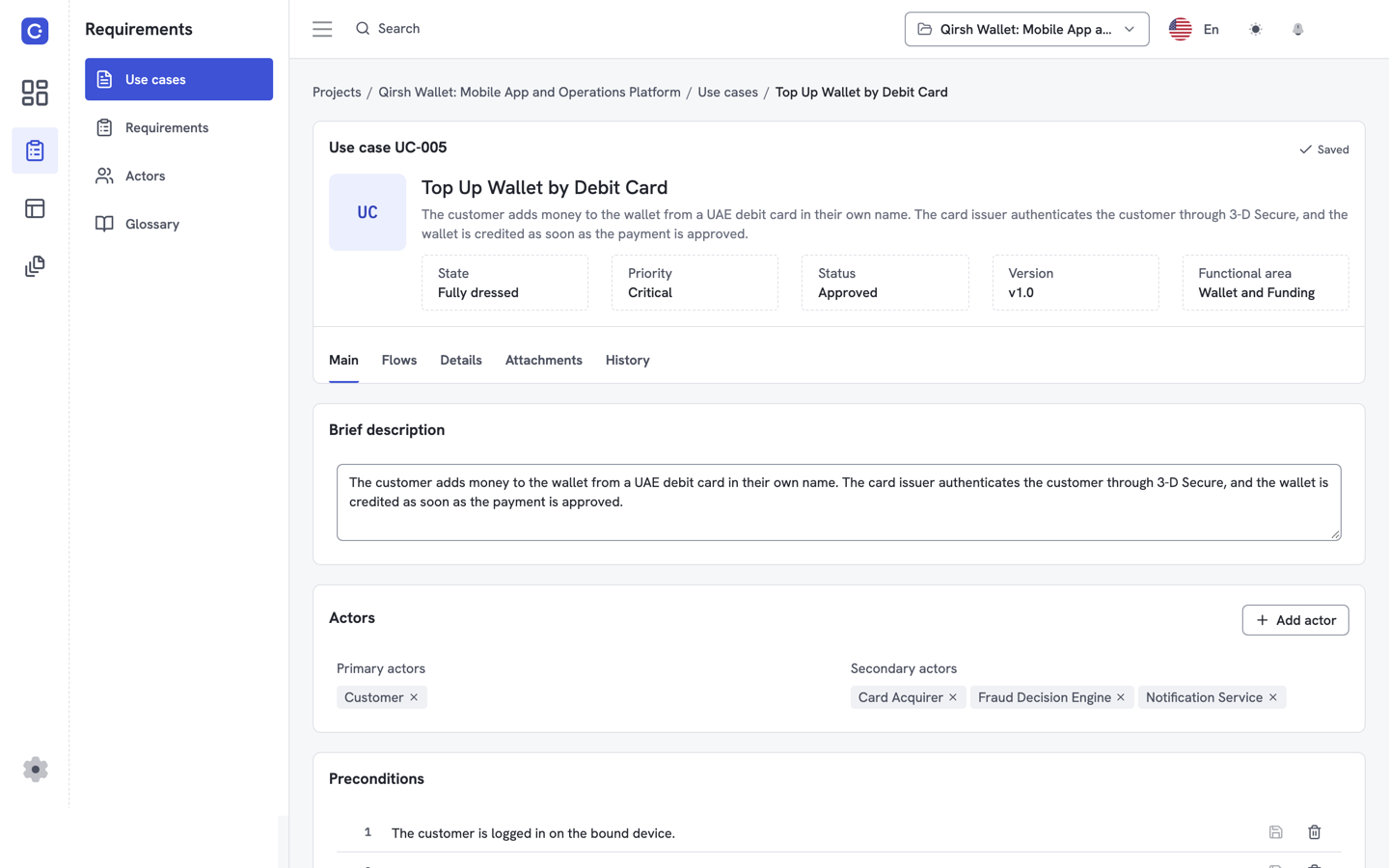
Structured use cases in the browser
Each use case has a goal, actors, preconditions and flows of events, the same starting point you know from CaseComplete.
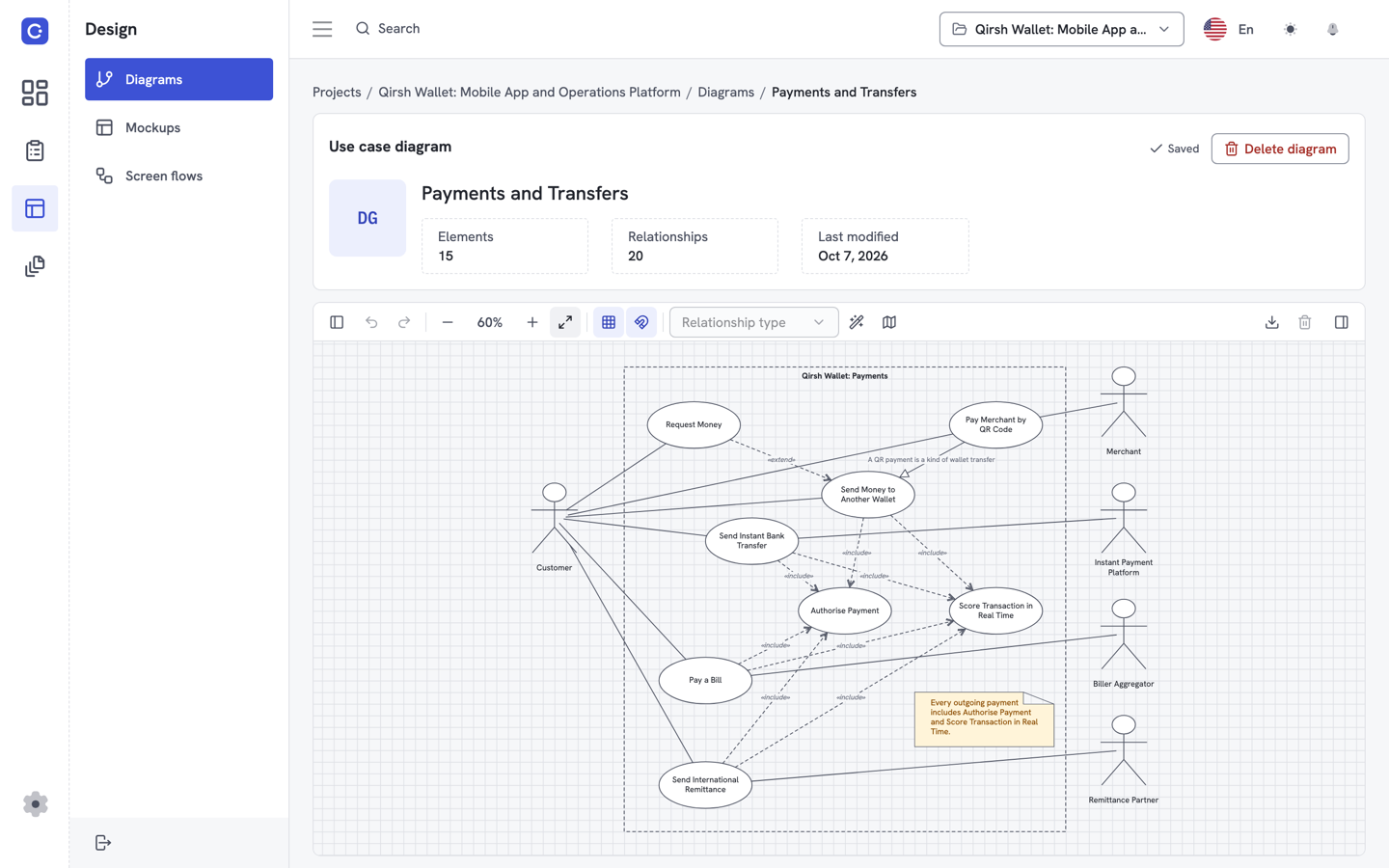
Diagrams linked to the text
Use case diagrams support include and extend relationships and live in the same project as the flows.
How do Flowifex and CaseComplete compare side by side?
The table separates what each vendor states publicly from what we could not confirm. Where a CaseComplete cell says “not stated”, that means the page we read did not mention it, not that the feature is missing.
| Topic | CaseComplete | Flowifex |
|---|---|---|
| Core job | Use case authoring and requirements gathering for agile teams and business analysts | Use cases, requirements, mockups and BRD in one linked workspace |
| How you use it | Installed software activated with a license key | Web app in the browser, share link for reviewers |
| Documents | Generates requirements documents automatically | Generates a 12-section BRD; share by link or export to Word and PDF |
| Traceability | Not stated on the pages we fetched | Requirements linked to individual steps; coverage matrix with CSV export |
| AI assistant access | Not stated on the pages we fetched | Remote MCP server with OAuth, on every plan |
| Entry price | Solo license $699, perpetual, one year of upgrades and support | Free plan $0, one member |
| Team of 10 | Large Team license $4,999 (up to 10 users) | Team 10: $300 a month or $3,000 a year, per project |
| Free evaluation | 30 days free | Free plan, one member, no card |
Sources, all accessed 2026-10-22: CaseComplete home page, CaseComplete pricing, CaseComplete free evaluation page, CaseComplete product tour. Flowifex figures come from our pricing page. CaseComplete prices are in dollars as listed; the vendor does not name the currency. Renewal prices after the first year are on a separate vendor page that we did not check.
How do the prices compare?
The two models are different, so a direct comparison needs care. CaseComplete is priced per license: a Solo license is $699, Small Team (up to 5 users) is $2,799 and Large Team (up to 10 users) is $4,999. The license is perpetual and includes free upgrades and support for one year.
Flowifex is priced per project. The Free plan is $0 for one member. Team 10 is $300 a month or $3,000 a year for up to 10 members, and Team 20 is $500 a month or $5,000 a year for up to 20. Yearly billing gives two months free, and you can cancel at the end of the billing period.
A one-time license costs less over many years if one team uses the same version for a long time. A subscription costs less up front and moves with the size of the project. Count the years you expect to use the tool before you decide.
Who should stay with CaseComplete?
Stay with CaseComplete if you already have projects in it and nothing is blocking you. Moving a live requirements set costs time, and Flowifex has no file import today.
Stay if your organization prefers a perpetual license and installed software over a subscription web app. Stay if you need custom document templates. Check CaseComplete's own documentation, because Flowifex generates a BRD with up to 12 sections and exports it to Word and PDF; it has no custom document-template feature.
Flowifex is not a systems-engineering suite. It does not sync with other trackers, has no single sign-on and has no simultaneous co-editing. Edit locks, comments and snapshots keep reviews orderly.
Who should switch to Flowifex?
Switch, or start new projects there, if you want to work in a browser, share drafts with reviewers by link and keep the diagram, the flows and the requirements in one place. It also fits analysts who want an AI assistant to draft and update use cases directly in the project.
You can test it on a real project before any team decision. The Free plan has one member and no card, so one analyst can try the full workflow alone.
Start with the use case template to see how a flow is structured, or read how the business requirements document template maps to the generated BRD. For the full product, see requirements management software and the requirements traceability matrix.
What are other CaseComplete alternatives?
Flowifex has comparison pages for these tools:
Other tools in the same space include Siemens Polarion ALM, PTC Codebeamer, Visure Requirements ALM, Perforce Helix ALM, Matrix Requirements, reqSuite rm and Inflectra SpiraTeam. Check each vendor's own pricing page, because plans and prices change. For more comparisons, see all alternatives.
CaseComplete alternative FAQ
Flowifex is the best fit if you want use cases, linked requirements and a generated BRD in a browser workspace, with a free solo plan. Stay with CaseComplete if you want a perpetual license for installed software.
Flowifex has a Free plan at $0 with one member, unlimited projects and all modeling features. No card is needed. Paid plans only raise the member cap and unlock no extra features.
There is no file import in the interface today. You can enter use cases by hand, or ask your own AI assistant to read your documents and write them into Flowifex over MCP. Check the result against your source before you rely on it.
Yes. Flowifex exports the generated 12-section business requirements document to Word and PDF, and shares it by link with an expiry date. It has no custom document-template feature.
Keep every spec in one place. Start with a free project.
Model use cases, link requirements and generate your BRD. Free plan, no card needed.